MCP server
Works with any MCP client or your own agent. Start a task, watch the screen, answer questions, stop.
"openmob": {
  "url": "https://openmob.fly.dev/mcp",
  "headers": {"Authorization": "Bearer <your API key>"}
}Invite-only beta · Android 11 and newer
One MCP server and REST API between your agent and a real phone. The phone judges every tap itself, so your agent can act without being handed the keys.
agent →
“Reorder my usual coffee beans and pay with the saved card.”
your phone →
Every tap
judged on the phone itself
Your model
pick the AI model for each task
For developers
Whichever way your agent connects, the same phone-side checks apply. Your key can tighten them, never loosen them past what the phone’s owner allows.
Works with any MCP client or your own agent. Start a task, watch the screen, answer questions, stop.
"openmob": {
"url": "https://openmob.fly.dev/mcp",
"headers": {"Authorization": "Bearer <your API key>"}
}Start tasks, stream events, answer questions. Scoped API keys and signed webhooks.
curl -X POST https://openmob.fly.dev/v1/devices/$DEVICE_ID/tasks \
  -H "Authorization: Bearer $OPENMOB_API_KEY" \
  -H "Content-Type: application/json" \
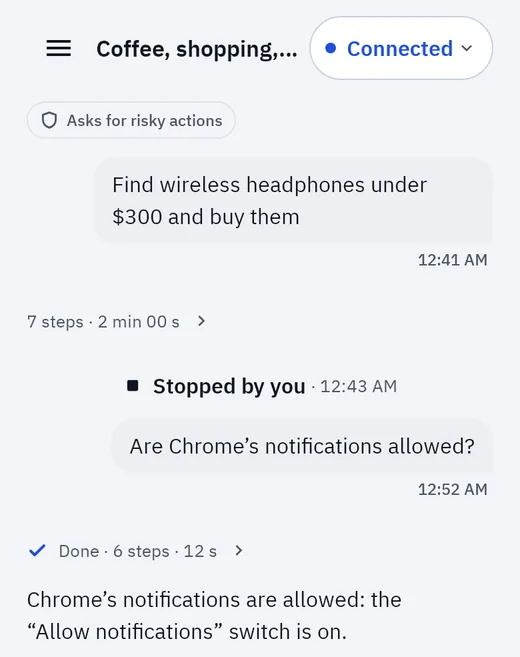
-d '{"instruction": "open YouTube and search for lo-fi"}'No code: chat with your agent in the OpenMob app, pick a model, and watch it work. A live view and Stop are always one tap away on the dashboard.
Security
Most agent tools trust whoever sends the command. OpenMob puts the final decision on your phone, with its own rules and its own keys, so a hacked server or a prompt-injected agent can at most ask: risky steps still wait for you, and blocked ones are refused.
Every action is checked on the device before it happens. Payments always ask you first; sends, posts, deletes and installs ask too, unless they’re what you asked for.
The keys that identify your phone and sign your approvals are sealed on the phone. They’re never backed up or moved to a new phone: a new phone pairs again.
Purchases and other high-risk steps take your PIN, pattern or fingerprint. Approval notifications never show what’s being asked: you see it in the app.
Banking, payment, wallet and password apps are off-limits. OpenMob never types into a password field and never unlocks your phone.
Card numbers and Social Security numbers are hidden in the activity feed, history, API events and webhooks, and typing one always asks you. Screenshots are never stored.
Stop from the dashboard, the API or the phone and the task stops right away. Disconnect on the phone and agents can’t reach it.
How it works
Install the app, then scan a QR code or type a short code. You confirm on the phone with your screen lock.
Make a scoped API key and add OpenMob to your MCP client, call the REST API, or just type in the app.
Follow every step in a live view. Approve risky ones on the phone. Stop any time.
To decide each step, what’s on screen is sent to the AI provider that runs your chosen model and, when the server uses one, as text to a screen-classification service. With Faster mode on (it’s off by default, and only you can turn it on, from the phone), small screenshots of screens without readable text, such as games, go to that service too. OpenMob never stores screenshots.
We’re opening OpenMob to a small group first. Have an invite link? Open it, or log in and choose “Have an invite code?”.